Load Testing a Phoenix API with k6 and Docker
I wanted to load test a Phoenix API without adding k6 to every developer’s machine.
The goal: one command that seeds test data, runs the load test, and cleans up — using Docker to run k6 so there’s nothing extra to install. The project is on GitHub.
The API
The Phoenix app exposes two endpoints:
| Method | Path | Description |
|---|---|---|
GET | /api/users | Paginated list of users |
GET | /api/users/:id | Single user by ID |
The controller is straightforward Ecto:
def index(conn, params) do
  page     = Map.get(params, "page", "1") |> String.to_integer()
  per_page = Map.get(params, "per_page", "20") |> String.to_integer()
  offset   = (page - 1) * per_page

  users =
    from(u in User, order_by: u.id, limit: ^per_page, offset: ^offset)
    |> Repo.all()

  json(conn, %{
    page: page,
    per_page: per_page,
    data: Enum.map(users, &%{id: &1.id, email: &1.email, name: &1.name})
  })
end
Nothing fancy — just a query with limit and offset and a clean JSON response. This is the target we’re load testing.
The Mix Task
The load test is a single Mix task:
mix load_test           # seeds 10,000 users (default)
mix load_test 50000     # seeds 50,000 users
It does three things in sequence: seed, test, clean up.
Seeding at scale
Inserting 10,000 rows one at a time is slow. Instead, we batch with Repo.insert_all/2:
@tag "load_test_"

defp seed_data(count) do
  now = DateTime.utc_now() |> DateTime.truncate(:second)

  1..count
  |> Stream.map(fn i ->
    %{
      email: "#{@tag}#{i}@test.com",
      name: "Load Test User #{i}",
      inserted_at: now,
      updated_at: now
    }
  end)
  |> Stream.chunk_every(1_000)
  |> Enum.each(&Repo.insert_all(User, &1))
end
Stream.chunk_every(1_000) splits the range into batches of 1,000, each inserted as a single multi-row INSERT. The @tag prefix is important — it’s what we use to identify and delete test records later.
Running k6 via Docker
Instead of requiring k6 to be installed locally, we run it via docker run:
defp run_load_test do
  {host, extra_args} =
    case :os.type() do
      {:unix, :darwin} -> {"host.docker.internal", []}
      _ -> {"localhost", ["--network", "host"]}
    end

  base_url = "http://#{host}:4000"

  System.cmd("docker", [
    "run", "--rm",
    "-v", "#{File.cwd!()}:/scripts",
    "-e", "BASE_URL=#{base_url}"
  ] ++ extra_args ++ [
    "grafana/k6", "run", "/scripts/priv/k6/load_test.js"
  ], into: IO.stream(:stdio, :line), stderr_to_stdout: true)
end
A few things worth noting here:
Docker networking differs by OS. On macOS, Docker containers can’t reach localhost on the host — you have to use host.docker.internal instead. On Linux, --network host lets the container share the host network, so localhost works. The case :os.type() handles this automatically.
into: IO.stream(:stdio, :line) streams k6’s output live to the terminal as it runs, so you see the progress table instead of waiting for the whole thing to finish before getting any output.
File.cwd!() mounts the current directory into the container at /scripts, which is how the k6 script inside priv/k6/ becomes accessible to the container.
Cleanup
After the test, we delete everything we seeded using the tag prefix:
defp cleanup do
  import Ecto.Query

  {count, _} = Repo.delete_all(
    from u in User, where: like(u.email, ^"#{@tag}%")
  )

  IO.puts("  Deleted #{count} records")
end
A LIKE query on the email prefix is simple and avoids needing to track IDs or use a separate table. The tradeoff is that it’s a full-table scan on a potentially large users table — fine for a dev/test environment, but you’d want an index on email in production.
The k6 Script
The script lives at priv/k6/load_test.js and is mounted into the Docker container at runtime:
export const options = {
  stages: [
    { duration: "10s", target: 10 },  // ramp up
    { duration: "30s", target: 50 },  // sustained load
    { duration: "10s", target: 0 },   // ramp down
  ],
  thresholds: {
    http_req_failed: ["rate<0.01"],   // <1% errors
    http_req_duration: ["p(95)<500"], // 95th percentile under 500ms
  },
};
The test ramps to 50 virtual users over 10 seconds, holds for 30 seconds, then ramps back down. The thresholds are what k6 uses to pass or fail the test run — if either is violated, k6 exits with a non-zero code, and the Mix task raises.
Each virtual user runs this loop:
export default function () {
  const page = Math.floor(Math.random() * 10) + 1;
  const listRes = http.get(`${BASE_URL}/api/users?page=${page}&per_page=20`);

  check(listRes, {
    "list: status 200": (r) => r.status === 200,
    "list: has data": (r) => JSON.parse(r.body).data.length > 0,
  });

  listTrend.add(listRes.timings.duration);

  const body = JSON.parse(listRes.body);
  if (body.data && body.data.length > 0) {
    const user = body.data[Math.floor(Math.random() * body.data.length)];
    const showRes = http.get(`${BASE_URL}/api/users/${user.id}`);

    check(showRes, {
      "show: status 200": (r) => r.status === 200,
      "show: correct id": (r) => JSON.parse(r.body).id === user.id,
    });

    showTrend.add(showRes.timings.duration);
  }

  sleep(0.5);
}
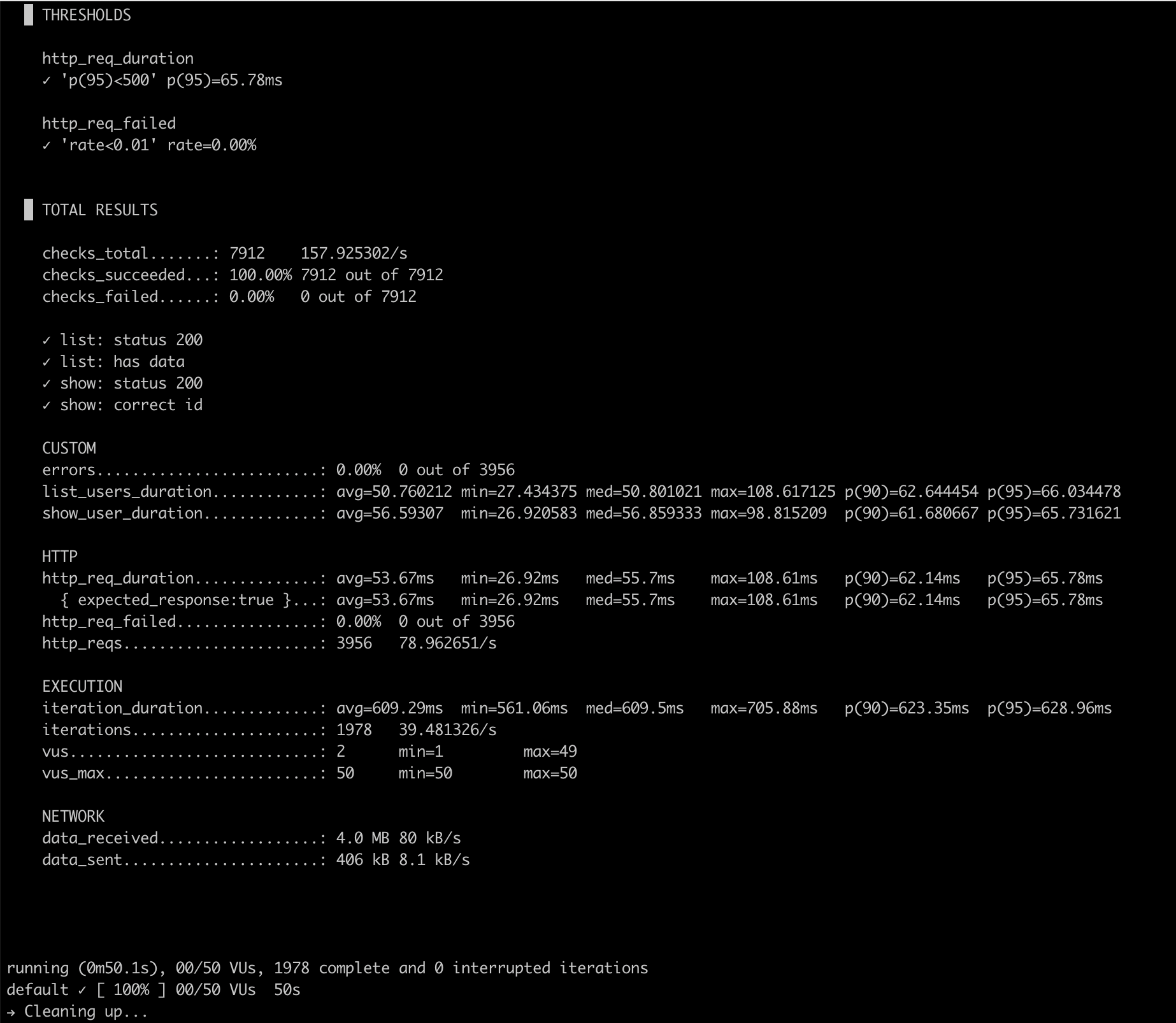
Each VU fetches a random page, then picks a user from that page and fetches them by ID. The custom Trend metrics (list_users_duration, show_user_duration) track latency separately for each endpoint in the k6 output.
Running It
# Terminal 1: start the server
mix phx.server

# Terminal 2: seed, test, clean up
mix load_test
Here’s what the output looks like after a real run:
What This Is For
This setup is useful when you want a repeatable load test alongside your application code — not as a separate repo or CI pipeline step, but as a mix command you can run locally while tuning queries or adding indexes.
The k6 script in priv/k6/ can be extended to test additional endpoints, add authentication headers, or adjust the load profile. And because Docker handles k6, the barrier to running it is just having Docker installed — which most developers already do.
References
- elixir-phoenix-load-test — the full project
- k6 documentation
- Repo.insert_all/3 — Ecto bulk insert
~Norman Argueta